Fairy AI Video Generator: 10-Second Winged Fairy Glow-Up from One Photo
Watch your everyday selfie ripple into a moonlit fantasy portrait with our Fairy AI Video generator. Starting from one clear head-and-shoulders photo, white butterflies swirl around your shoulders as your clothes transform into a glowing gown, translucent iridescent wings unfold behind your back, and the camera pushes in on your smiling face crowned with silver leaves.
- 10s
- 1 person
- 9:16 vertical
Make a 10-second Fairy AI Video from one photo. Transform your portrait into a glowing moonlit forest fairy or Halloween pumpkin fairy with iridescent wings.
- 1 Your photo
- 2 Free preview
- 3 Your video
Star in Fairy AI Video
Add a photo and see yourself in the scene first, free.
Free preview first · Automatic refund if it fails
By making it, you confirm you have permission to use the uploaded photos.
The 6-Beat Butterfly Gown Ripple, Wing Anchor & Leaf-Crown Pipeline
- Quality Options
- HD (720p) · Full HD (1080p)
- Credit Price
- From 10 credits (HD · 720p)
- Length & Format
- 10s · 9:16 HD
- Input
- 1 Photo(s)
- 1. Face, Eye-Color & Natural Hair Continuity Lock Keeps your exact facial structure, skin tone, and real hairstyle recognizable across the full wardrobe and background transformation, weaving in only subtle floral accents.
- 2. Neckline-Down Butterfly Gown Morph Uses a swirl of white butterflies at 1.5 seconds to transition your everyday shirt into a shimmering fairy gown without a jarring hard cut.
- 3. Shoulder-Pinned Symmetric Translucent Wings Anchors a single pair of iridescent butterfly wings directly to your upper back so they unfold smoothly at 4.0 seconds without multiplying or floating off.
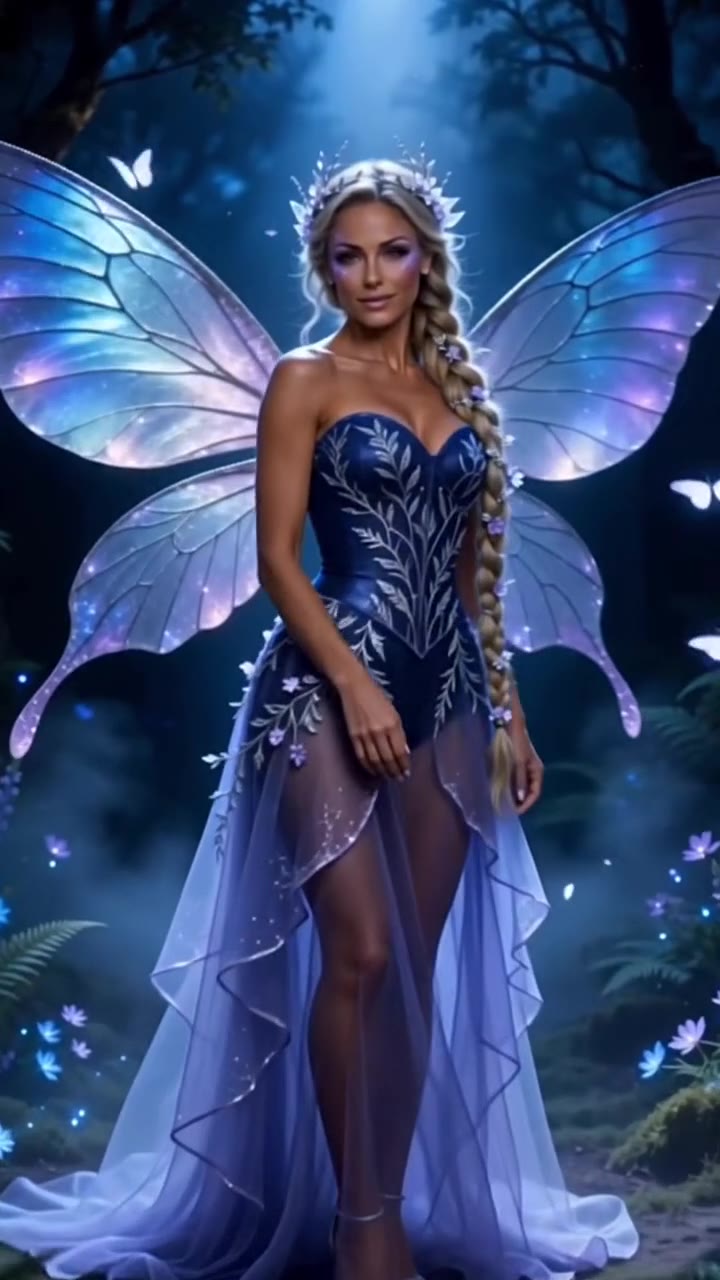
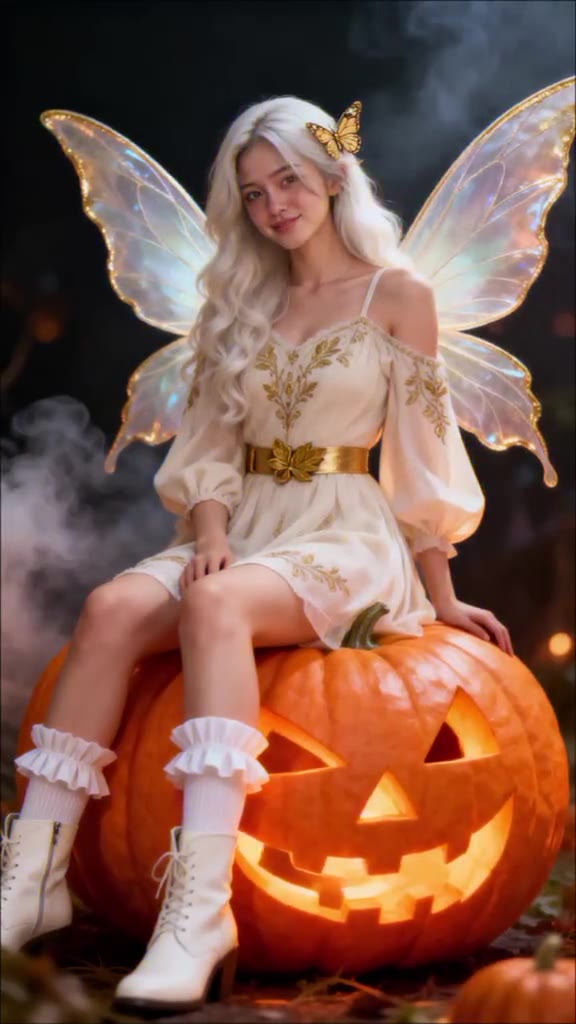
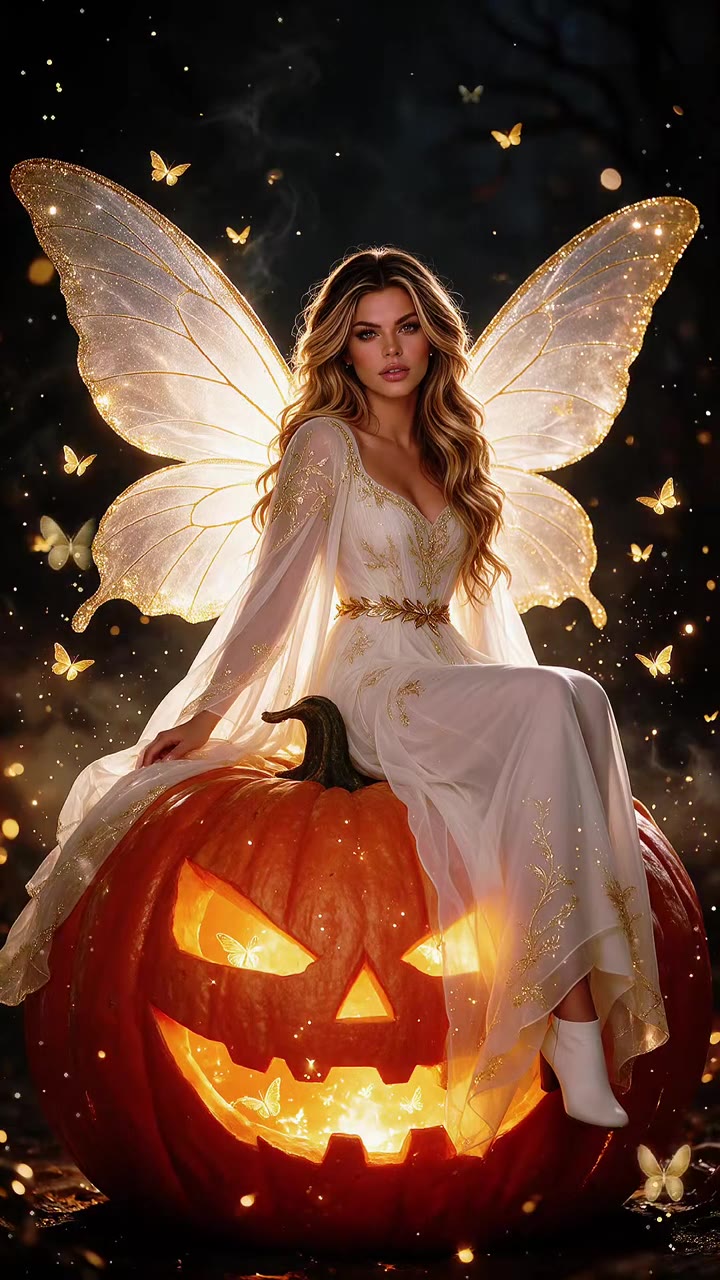
- 4. Two Original Fantasy Worlds (Moonlit Blue or Pumpkin) Lets you choose between a cool moonlit forest in a navy gown or an autumn night perched on a giant glowing jack-o’-lantern in a cream dress.
- 5. Copyright-Safe Original Fairy Styling Creates a bespoke live-action fantasy look without wands, copyrighted film costumes, or on-screen text overlays.
Photorealistic 10-second continuous fantasy transformation shot. Lock 100% of the subject’s facial identity, eye color, skin tone, and natural hair color/length to your uploaded photo from the opening frame through the final close-up. Progress through six timed beats: (1) 0–1.5s original portrait in everyday clothes, (2) 1.5–2.5s fluttering white butterflies trigger a neckline-down ripple into an original fairy gown, (3) 2.5–4.0s camera pullback as the background melts into a misty moonlit forest or glowing giant jack-o’-lantern, (4) 4.0–5.0s one symmetric pair of translucent iridescent wings unfolds cleanly from the shoulder blades, (5) 5.0–8.0s wide fantasy reveal, and (6) 8.0–10.0s push-in close-up with a delicate silver leaf crown and natural smile.
Why Manual Editing Falls Short
- Stranger Face After the Gown Change: Without a continuous motion reference, changing the outfit and background at the same time causes generic models to discard the original face.
- Detached or Multiplying Wings: Unconstrained prompts frequently spawn extra wing pairs or let the wings drift sideways during the camera pullback.
- Hard Cuts Instead of a Smooth Ripple: Standard image-to-video tools struggle to bridge an everyday T-shirt and a fantasy forest in one unbroken 10-second camera move.
✓How HotDance AI Solves It
HotDance AI binds the six-beat camera move, shoulder-pinned wing geometry, and facial identity lock in our Fairy AI Video pipeline so one portrait delivers a seamless 10-second transformation.
Fairy AI Video examples
How to make your Fairy AI video
Upload one clear head-and-shoulders photo
Pick a well-lit front-facing photo showing your head, hair, and shoulders. Your real hair color and length carry directly into the fairy look.
Choose Moonlit Blue Fairy or Halloween Pumpkin Fairy
Select the navy gown in a moonlit forest or the cream dress on a glowing jack-o’-lantern, and pick 9:16 vertical or 16:9 widescreen.
Generate & download your 10-second MP4
Click Generate to render a watermark-free 10-second MP4 with the trend’s magical audio track included and ready to post.
What Is the Viral Fairy AI Video Transformation Trend?
Remake the Fairy AI Video trend on HotDance AI (hotdanceai.com): upload 1 photo, check your instant AI character frame preview with no sign-up, and render a 10s watermark-free HD video with synced audio from 10 credits — no prompt writing or reference video needed.
The Fairy AI Video trend—shared across TikTok and Instagram Reels as the "Fairy Transformation" glow-up—is a 10-second single-take clip that turns a casual portrait into a live-action woodland fantasy. It begins on your original photo in everyday clothes, brings in fluttering white butterflies that ripple your top into a glowing gown, pulls back to reveal translucent iridescent wings in a misty night forest, and pushes back in on your smiling face wearing a delicate crown of silver leaves.
Two signature styles drive the trend: the Moonlit Blue Fairy in a shimmering navy gown surrounded by forest fireflies, and the seasonal Halloween Pumpkin Fairy in a soft cream dress perched on a giant carved jack-o’-lantern. Because the final two seconds return to a tight close-up of the subject’s face, friends and followers immediately recognize who is inside the fantasy scene.
HotDance AI automates the entire six-beat transformation inside your browser. Our Fairy AI Video generator locks your facial features and real hairstyle from the first second to the tenth, delivering a clean, watermark-free MP4 without mobile template apps or manual prompting.
Fairy AI Video timeline breakdown
Original Portrait & Butterfly Gown Ripple
Opens on your uploaded portrait in your own clothes before white butterflies flutter around your shoulders and ripple your outfit into a glowing fairy gown.
Night Forest Pullback & Iridescent Wings Unfolding
The camera pulls back as the background melts into a misty moonlit forest (or giant jack-o’-lantern) and translucent butterfly wings unfold smoothly behind your shoulders.
Silver Leaf-Crown Close-Up Smile
Pushes back in for an intimate close-up as you lift a hand near your cheek and smile into the lens with a crown of silver leaves woven into your hair.
Pro tips for the sharpest Fairy AI Video render
Frame from the head to the waist or shoulders
Because the gown and wings anchor to your shoulders and upper torso, a photo that includes your shoulders gives a much cleaner transition than a tight chin-to-forehead crop.
Pick a photo where you love your hair
The generator keeps your natural hair color, part, and length and weaves small flowers and silver leaves into it rather than replacing it with a wig.
Keep hats, sunglasses, and heavy filters off
The 8–10 second payoff is a close-up of your eyes and smile under the leaf crown, so a clear, unobstructed face in even lighting works best.
Viral Fairy AI Video ideas and creative twists to try
Moonlit Forest Glow-Up Reveal
"Casual daylight selfie showing head and shoulders + Moonlit Blue Fairy preset + 9:16 vertical"
Contrast a casual street or bedroom selfie in the first second with a dramatic navy-gown and blue-wing reveal in a misty night forest.
Spooky-Season Jack-o’-Lantern Pumpkin Fairy
"Front-facing portrait of you or a consenting friend + Halloween Pumpkin Fairy preset + 9:16 vertical"
Create an autumn or Halloween fantasy reel perched atop a glowing carved pumpkin in a cream fairy dress.
Frequently asked questions about Fairy AI Video
How do I make a Fairy AI Video transformation from one photo?
Upload one clear front-facing photo showing your head and shoulders, choose Moonlit Blue Fairy or Halloween Pumpkin Fairy, select 9:16 or 16:9, and click Generate. Your 10-second transformation MP4 renders in your browser with no text prompt required.
What is the difference between the Moonlit Blue and Halloween Pumpkin styles?
Moonlit Blue Fairy transforms your outfit into a shimmering navy gown with blue iridescent wings in a misty night forest, while Halloween Pumpkin Fairy dresses you in a cream gown perched on a giant glowing jack-o’-lantern.
Does the transformation keep my real hair color and hairstyle?
Yes. Your hair color, texture, and length are preserved from your uploaded photo, with small flowers and a silver leaf crown added during the final close-up.
Do my original clothes stay in the video?
Your original clothes appear during the first 1.5 seconds so viewers see the "before" photo, and then ripple into the fairy gown as the butterflies arrive.
Does the downloaded MP4 include sound and have no watermark?
Every 10-second MP4 downloads completely free of watermarks and includes the trend’s audio track, which you can keep or swap inside TikTok, Reels, or Shorts.
How many credits does a 10-second render cost, and what if it fails?
A standard 10-second 720p render starts at 10 credits, and if a generation ever fails, times out, or is blocked, your credits are automatically refunded.






More Effects Like This

Render your viral dance clip in seconds
Upload your photo and hit Generate. 100% watermark-free HD export (up to Full HD 1080p).
How much does an AI dance video cost?
Basic
100 credits / month · ≈ 10 videos
$29.90/mo
≈ $2.99 / video
- Watermark-free HD export
- 100 fresh credits monthly
- Unused balance rolls over
- Cancel subscription anytime
ProSave 17%
200 credits / month · ≈ 20 videos
$49.90/mo
≈ $2.50 / video
- Clean 1080p MP4 downloads
- 200 monthly generation credits
- Automatic credit rollover
- Flexible monthly billing
StudioSave 26%
450 credits / month · ≈ 45 videos
$99.90/mo
≈ $2.22 / video
- Priority queue & 1080p output
- 450 credits refreshed monthly
- Keep unused monthly credits
- One-click account management
Or buy credits once
Basic: 10 videos a month for $29.90. The Crew Pack is 25 videos for $99, once.
Single
10 credits · ≈ 1 video
$9.90
≈ $9.90 / video
- Zero watermark on output
- Ready for TikTok & Reels
- Balance stays valid forever
- Auto-refund on failed tasks
Trio PackSave 39%
30 credits · ≈ 3 videos
$17.99
≈ $6 / video
- Unbranded HD video files
- Share across social feeds
- No expiration date on pack
- Instant credit return if blocked
Squad PackSave 41%
50 credits · ≈ 5 videos
$29
≈ $5.80 / video
- Full commercial social rights
- Export vertical 9:16 or 16:9
- Lifetime credit validity
- Protected against render errors
Crew PackSave 60%
250 credits · ≈ 25 videos
$99
≈ $3.96 / video
- Studio-grade watermark-free MP4
- Post to Shorts, Reels & TikTok
- Credits never expire
- Failed renders are refunded
Studio PackSave 66%
600 credits · ≈ 60 videos
$199
≈ $3.32 / video
- High-volume creator bundle
- Supports Ultra & Seedance 2.0
- Use at your own schedule
- 100% credit guarantee on failures
Label PackSave 72%
1800 credits · ≈ 180 videos
$499
≈ $2.77 / video
- Agency & multi-channel scale
- Lowest cost per rendered clip
- Permanent credit balance
- Zero risk on interrupted jobs
Get the next viral trend first
One email whenever a new TikTok or Reels AI trend explodes on HotDance AI. Unsubscribe at any time.
Search HotDance AI on Google
Add HotDance AI to your bookmarks or preferred sources on Google to get instant access to new trending AI video templates before they peak.