Instagram Profile Cleaning AI Video: Privacy-Safe Screenshot Rules, Text Stability Limits & Pricing
Exact 2-slot inputs (selfie + mobile profile screenshot), zero-login privacy safeguards, Seedance 2.5 credit rates (17–93 cr), and honest text-stability limits for usernames, bios, and grids.
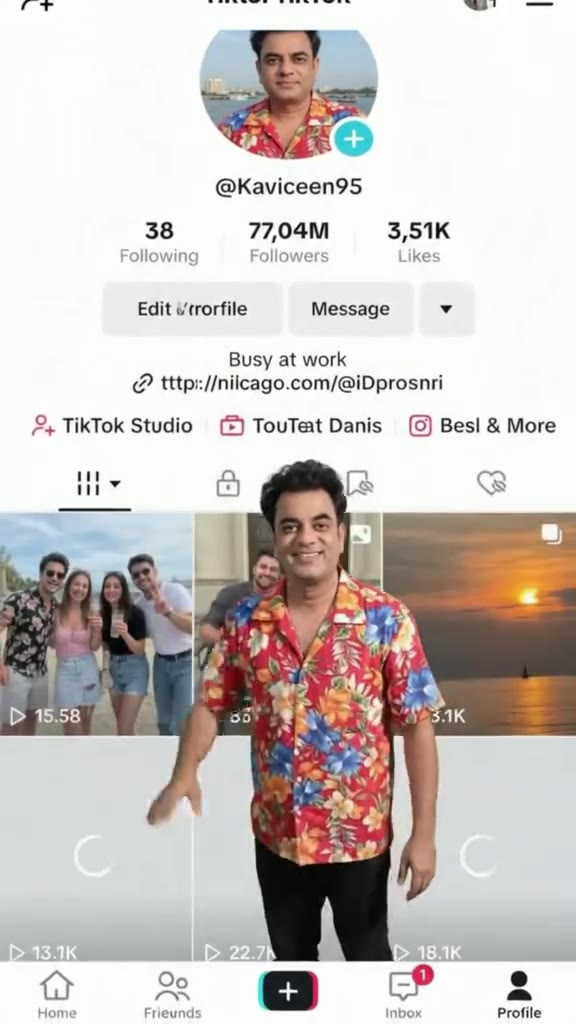
To generate the mini-me profile wiping trend on the Instagram Profile Cleaning AI Video template at HotDance AI (hotdanceai.com), upload two static images (JPG, PNG, WEBP, or HEIC): your portrait in Photo of Yourself and a vertical mobile capture in Screenshot of Your Instagram Profile. The template never asks for an Instagram login, password, OAuth permission, or 2FA code, produces a 10-second watermark-free MP4 routed to Seedance 2.5 (17 credits Standard 480p, 37 credits HD 720p, or 93 credits Full HD 1080p) after a 0-credit GPT Image 2.6 still-frame preview, and does not edit your real Instagram account. Important caveat: because Seedance 2.5 regenerates every frame via video diffusion rather than compositing over a locked 2D screenshot, micro-text such as your username, bio copy, follower count, and 3-column post thumbnails can soften or wobble—and pixel-identical text stability across frames is not verified or guaranteed.
Below is how the 2-slot workflow protects your account security, exactly where diffusion text drift happens, and what credits and refunds apply.
Instagram Profile AI Video Specs, Security & Credit Rates
| Specification | Verified Template Behavior (Instagram Profile AI Video) |
|---|---|
| Two Dedicated Input Slots | Slot 1: |
| Instagram Access Required | Zero — no username login, password, OAuth connection, or two-factor code is requested. Purely visual rendering from your static screenshot. |
| Visual Style Presets | 3 built-in styles: |
| Pre-Pay Still Preview | 0 credits, no sign-up — OpenAI GPT Image 2.6 previews your miniature character against your profile screenshot (up to 3 per template, 15 total per visitor, 15 per IP/day). Static frame only, not a playable video. |
| Engine, Duration & Credits |
|
| Billing, Refunds & Deletion | One-time packs from $9.90 (10 cr) or $17.99 Trio Pack (30 cr); credits deduct atomically when submitting the paid video render and refund 100% automatically if a render fails or is blocked. Uploaded images and videos auto-delete within 30 days. |
Will Username, Bio Text, Follower Count, and Post Grid Stay Pixel-Sharp?
Creators often compare AI templates against CapCut or After Effects keyframe templates and ask whether every character in the @handle, bio line, follower count, and 9-square photo grid remains crisp and unchanged throughout all 10 seconds.
Honest technical answer:
- Diffusion synthesis vs. 2D layer compositing: Instead of locking your PNG screenshot on a frozen background layer while overlaying a transparent cutout animation,
Instagram Profile Cleaning AI Videorenders both the miniature figure and the underlying mobile interface inside Seedance 2.5 frame-by-frame video diffusion so hand shadows, wiping gestures, and depth perspective interact naturally with the screen. - Unverified zero-drift claim: HotDance AI has not run a frame-by-frame OCR or pixel-stability benchmark verifying exact character locking across small profile typography. Small fonts (usernames, follower figures, bio emojis) and dense 3-column post thumbnails commonly soften, shimmer, or subtly reshape—especially in areas where the white cleaning rag or hands cross over the bio.
- How to minimize text muddiness within the template: Start with a full-resolution direct phone screenshot (
PNGsaved straight to Camera Roll rather than re-compressed via messaging apps), turn on Dark or high-contrast Light mode so text stands out sharply, pick HD 720p (37 credits) or Full HD 1080p (93 credits) when higher screen legibility matters more than economy, and check the free still preview first. - When to choose manual 2D editing instead: If legal disclaimers, exact promo codes, or readable fine print inside the bio are mandatory for every frame of a campaign post, use a traditional non-generative editor overlay rather than any diffusion video generator.
Prepare a Privacy-Safe Screenshot & Matching Selfie
Because anything visible inside your screenshot is processed as visual pixels and may appear in the final video clip:
- Hide private banners and account data first: Enable Do Not Disturb before taking your mobile screenshot so incoming DM previews, phone numbers, email alerts, or login prompts never enter the frame.
- Capture the three expected profile zones cleanly: Include the circular avatar at top-left, bio header in the middle, and photo grid below—without bottom pop-ups or keyboard overlays.
- Never photograph or upload login/security screens: The generator only models your public-facing layout aesthetics and has zero link to Instagram's servers; review our Privacy Policy and 30-day automatic deletion policy for full data terms.
- Match Slot 1 and Slot 2 accurately: Place your clear, unobstructed selfie in Photo of Yourself and your clean mobile screenshot in Screenshot of Your Instagram Profile.
Can You Upload a Website Homepage or Storefront Instead?
This template is tuned specifically around a mobile vertical social profile structure (circular avatar + header stats + square post grid). Desktop browser homepages, Shopify storefronts, and landscape dashboards have not been tested or confirmed on this template—do not assume non-profile layouts will reconstruct cleanly without checking the 0-credit still preview or testing against a mobile layout.
Credit Timing, Auto-Refunds & Cost Math
0 creditsupfront: Browse, upload both files, switch amongRealistic Mini Me,Sticker Cut-Out, andLife-Size Screen Interaction, and inspect your GPT Image 2.6 still-frame preview at zero cost and without signing up.- Pay only at video generation submit: Credits (
17 cr480p /37 cr720p /93 cr1080p) deduct atomically only when you press confirm on the paid video render via passwordless Stripe / Apple Pay / Google Pay or your existing pack balance (Pricing). - 100% auto-refund on failures: Failed, timed-out, or moderation-rejected tasks return 100% of deducted credits automatically. Confirmed un-swapped outputs remain eligible for support credit review (
support@hotdanceai.comper Refund Policy).
Prepare a redacted, native-resolution profile screenshot and front-facing selfie on the Instagram Profile Cleaning AI Video page and verify the 0-credit character still preview before rendering.