Eye Close Up Prompt Video Generator
Turn one portrait into the hypnotic eye close up prompt video on HotDance AI. Transform your gaze into a cinematic sideways macro study illuminated by warm amber light, crisp eyelash micro-detail, and smooth 4-second editorial cuts.
- 4s
- 1 person
- 9:16 vertical
Recreate the viral eye close up prompt video from one selfie on HotDance AI. Warm sideways iris macro transitions in a 4-second watermark-free HD MP4.
- 1 Your photo
- 2 Free preview
- 3 Your video
Star in Eye Close Up
Add a photo and see yourself in the scene first, free.
Free preview first · Automatic refund if it fails
By making it, you confirm you have permission to use the uploaded photos.
Macro Sideways Gaze & Blink Study
- Quality Options
- HD (720p) · Full HD (1080p)
- Credit Price
- From 10 credits (HD · 720p)
- Length & Format
- 4s · 9:16 HD
- Input
- 1 Photo(s)
- Iris & Lash Micro-Lock Anchors your natural eye pigment, brow arch, and upper-lid crease directly to every macro frame.
- Directional Shutter Transitions Executes clean sideways frame glides and crisp cinema cuts without muddying pupil reflections.
- Warm Skin Filmic Grain Applies subtle amber highlights or cool monochrome tonal contrast while keeping pores natural.
Vertical 9:16 4-second eye close up prompt macro portrait sequence driven by the facial details of your uploaded photo. Compose the frame rotated 90 degrees sideways across the eyes and upper bridge of the nose, locking exact iris color, pupil catchlight, brow shape, and skin freckles from your photo. From 0 to 1.5 seconds, hold an intimate still close-up bathed in diagonal golden light while subtle lens breath glides across crisp eyelashes. From 1.5 to 3 seconds, transition through a silky cinema shutter wipe into a slightly tighter micro-crop capturing a slow unhurried blink and soft lateral gaze shift. From 3 to 4 seconds, settle smoothly into a luminous glossy eye highlight with delicate shallow depth of field. Clean pore micro-texture, natural sclera veins, zero pupil drift.
Why Manual Editing Falls Short
- Generic diffusers frequently morph iris patterns or create mismatched pupil sizes during sideways close-up transitions.
- Aggressive beauty smoothing wipes away authentic eyelash separation and subtle golden-hour skin texture.
- Rotating a vertical frame 90 degrees often disorients gravity cues, causing eyebrows and tear ducts to drift unnaturally.
✓How HotDance AI Solves It
HotDance AI isolates eyelid creases, iris pigments, and specular catchlights from [INPUT_PHOTO] for every eye close up prompt render so even tight macro cuts stay organic and crisp.
Eye Close Up examples
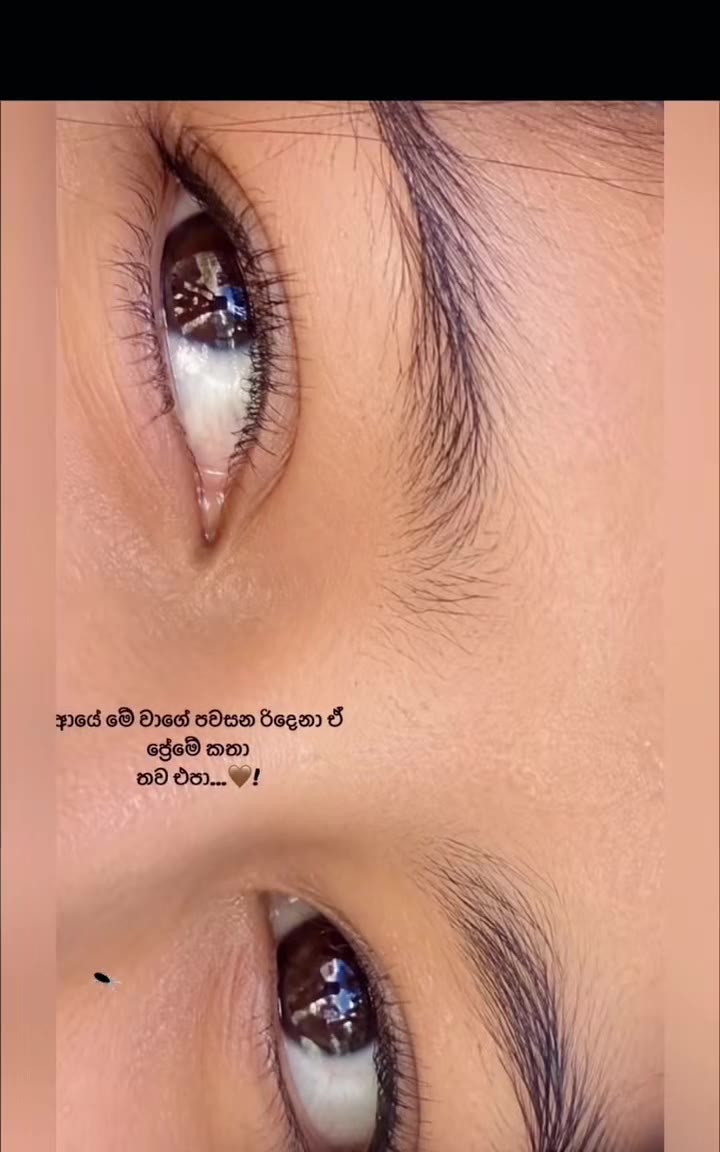
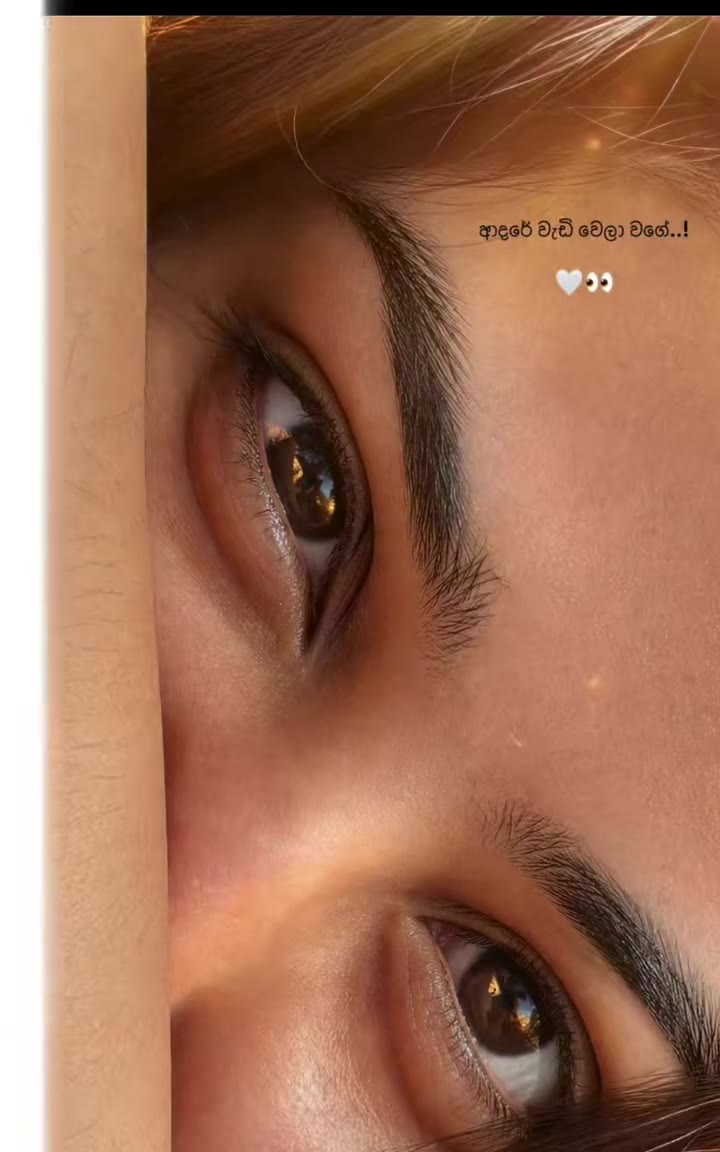
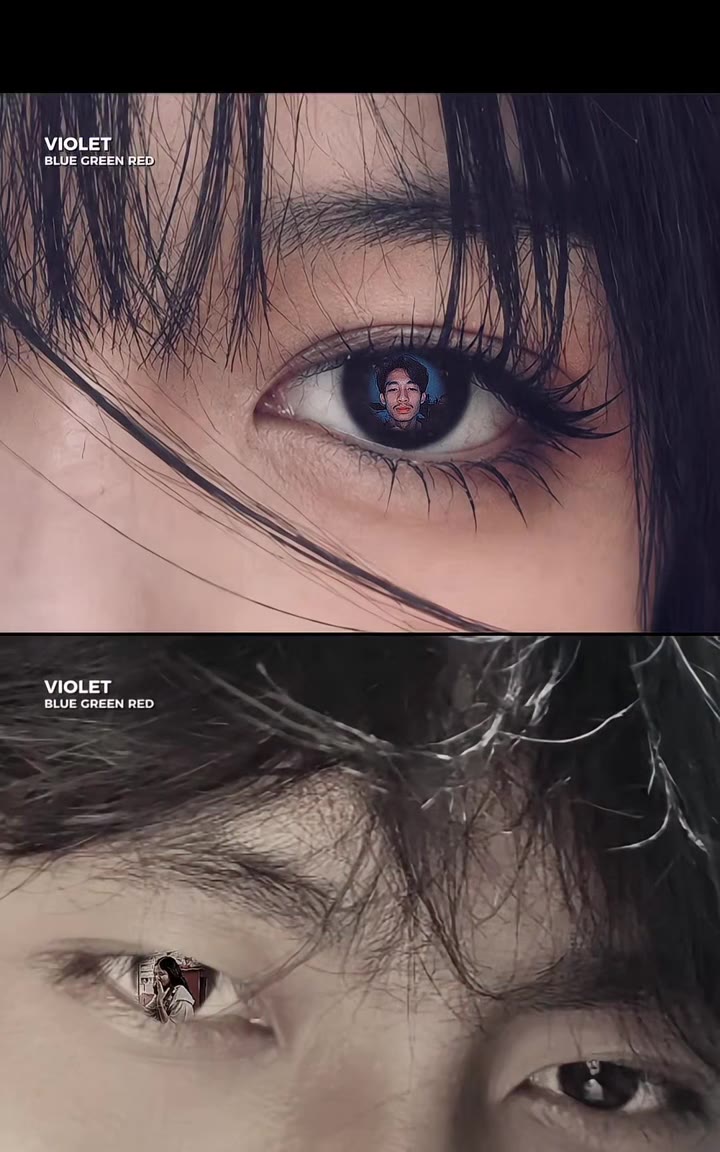
How to make your Eye Close Up video
Upload a sharp portrait
Select a well-lit selfie or close portrait where both eyes appear focused and crisp.
Pick Golden Hour or Monochrome
Choose warm amber sunlight or silver editorial contrast to set the color grade.
Download watermark-free HD MP4
Save your 4-second eye close up prompt macro clip with synced soundtrack ready for Reels.
What Is the Eye Close Up Prompt Trend?
Remake the Eye Close Up trend on HotDance AI (hotdanceai.com): upload 1 photo, check your instant AI character frame preview with no sign-up, and render a 4s watermark-free HD video with synced audio from 10 credits — no prompt writing or reference video needed.
The eye close up prompt trend turns an ordinary portrait into a deeply intimate four-second sideways macro montage focused strictly on the brow ridge, lashes, and sunlit iris. Rotated vertically across a full-screen 9:16 phone canvas, subtle shutter transitions shift between tight eye angles scored to moody acoustic hooks.
Originating from minimalist beauty and poetic lyric reels across TikTok and Instagram, the eye close up prompt look resonates because even a split-second glance or slow blink carries cinematic emotion without needing expensive macro glass or studio ring lights.
HotDance AI delivers the complete eye close up prompt workflow from one everyday selfie. Precision landmark tracking keeps iris reflections glass-clear and eyelashes individually defined inside a clean 4-second watermark-free MP4.
Eye Close Up timeline breakdown
Amber Sideways Macro Open
Warm diagonal light sweeps across the sideways eye strip, highlighting individual brow hairs and clear amber catchlights.
Shutter Cut & Slow Blink
A velvety black transition band slides cleanly into a tighter macro angle as the eyelid performs a calm, deliberate blink.
Luminous Gaze Hold
The focus locks softly onto the glossy cornea and gentle sideways glance right before the seamless 4-second loop restarts.
Pro tips for the sharpest Eye Close Up render
Shoot near a window in natural light
Clean window catchlights give the macro iris render real depth and bright glassy sparkle.
Upload uncropped eye area clarity
High-resolution portraits without beauty filters let Seedance 2.0 preserve crisp eyelashes and skin detail.
Remove glasses or heavy brim hats
Frames and cast shadows block corneal reflection symmetry during sideways macro crops.
Viral Eye Close Up ideas and creative twists to try
Poetic Lyric POV Story
"Window-lit selfie + Golden Hour Macro preset + short ballad clip"
Pair your 4-second eye close up prompt video with subtle caption typography for romantic Instagram Reels and Stories.
Cool Silver Aesthetic Edit
"Editorial portrait + Monochrome Silver Edit preset + HD export"
Use the high-contrast monochrome mode inside the eye close up prompt builder for moody music teasers or profile loops.
Frequently asked questions about Eye Close Up
How do I make the eye close up prompt video from my selfie?
Upload one sharp selfie with clear eyes, select Golden Hour Macro or Monochrome Silver Edit, and click Generate to produce your 4-second vertical MP4.
How many credits does this macro eye generator cost?
The template starts at 10 credits in HD (720p) for a 4-second render, or 93 credits in Full HD (1080p), always exported watermark-free.
Why is the finished eye close up prompt video 4 seconds long?
Short four-second rhythmic edits loop effortlessly on Instagram Reels and TikTok, keeping completion rates high across rapid shutter cuts.
Can I upload a regular full-face selfie instead of a macro camera shot?
Yes. Upload a standard high-resolution front selfie taken in good light and HotDance AI automatically composes the sideways tight crop.
Does the clip come with audio ready for social sharing?
Yes, every finished video ships with synced background audio baked into the clean MP4 download.
How long does rendering take on HotDance AI?
Four-second macro videos typically complete in around one minute and appear ready to save in your browser.






Render your viral dance clip in seconds
Upload your photo and hit Generate. 100% watermark-free HD export (up to Full HD 1080p).
How much does an AI dance video cost?
Basic
100 credits / month · ≈ 10 videos
$29.90/mo
≈ $2.99 / video
- Watermark-free HD export
- 100 fresh credits monthly
- Unused balance rolls over
- Cancel subscription anytime
ProSave 17%
200 credits / month · ≈ 20 videos
$49.90/mo
≈ $2.50 / video
- Clean 1080p MP4 downloads
- 200 monthly generation credits
- Automatic credit rollover
- Flexible monthly billing
StudioSave 26%
450 credits / month · ≈ 45 videos
$99.90/mo
≈ $2.22 / video
- Priority queue & 1080p output
- 450 credits refreshed monthly
- Keep unused monthly credits
- One-click account management
Or buy credits once
Basic: 10 videos a month for $29.90. The Crew Pack is 25 videos for $99, once.
Single
10 credits · ≈ 1 video
$9.90
≈ $9.90 / video
- Zero watermark on output
- Ready for TikTok & Reels
- Balance stays valid forever
- Auto-refund on failed tasks
Trio PackSave 39%
30 credits · ≈ 3 videos
$17.99
≈ $6 / video
- Unbranded HD video files
- Share across social feeds
- No expiration date on pack
- Instant credit return if blocked
Squad PackSave 41%
50 credits · ≈ 5 videos
$29
≈ $5.80 / video
- Full commercial social rights
- Export vertical 9:16 or 16:9
- Lifetime credit validity
- Protected against render errors
Crew PackSave 60%
250 credits · ≈ 25 videos
$99
≈ $3.96 / video
- Studio-grade watermark-free MP4
- Post to Shorts, Reels & TikTok
- Credits never expire
- Failed renders are refunded
Studio PackSave 66%
600 credits · ≈ 60 videos
$199
≈ $3.32 / video
- High-volume creator bundle
- Supports Ultra & Seedance 2.0
- Use at your own schedule
- 100% credit guarantee on failures
Label PackSave 72%
1800 credits · ≈ 180 videos
$499
≈ $2.77 / video
- Agency & multi-channel scale
- Lowest cost per rendered clip
- Permanent credit balance
- Zero risk on interrupted jobs
Get the next viral trend first
One email whenever a new TikTok or Reels AI trend explodes on HotDance AI. Unsubscribe at any time.
Search HotDance AI on Google
Add HotDance AI to your bookmarks or preferred sources on Google to get instant access to new trending AI video templates before they peak.