Shoulder Carry AI Video Generator: 9s Couple Swing-Down Trend
Upload two photos—Photo 1 for the person carried on top and Photo 2 for the carrier—to generate the 9-second Shoulder Carry AI routine: opening over-the-shoulder lift, smooth swing-down flip, close-up camera lean, and the carrier’s thumbs-up finish.
- 9s
- 2 people
- 9:16 vertical
- ≈75K views
Create the viral Shoulder Carry AI video from two photos. Carry your partner or friend on your shoulders, swing down into the lens in 9s HD with synced audio.
- 1 Your photo
- 2 Free preview
- 3 Your video
Star in Shoulder Carry AI
Add a photo and see yourself in the scene first, free.
Free preview first · Automatic refund if it fails
By making it, you confirm you have permission to use the uploaded photos.
Shoulder Carry AI Role-Assignment & Swing-Down Physics Spec
- Quality Options
- Standard (480p) · HD (720p) · Full HD (1080p)
- Credit Price
- From 17 credits (Standard · 480p)
- Length & Format
- 9s · 9:16 HD
- Input
- 2 Photo(s)
- Carried vs. Carrier Dual-Role Binding Assigns Photo 1 strictly to the person carried on top (who lands in the close-up at 4s) and Photo 2 to the standing carrier who gives the thumbs-up at 7s.
- Opening Over-the-Shoulder Hold (0–2.5s) Locks the carrier’s upright stance and facial likeness while the carried partner’s legs drape across the front chest on the opening beat.
- 2.5–4.0s Forward Swing-Down Trajectory Guides the continuous over-the-shoulder pivot and dismount so limbs never detach or twist unnaturally during the 1.5-second transition.
- 4.0–7.0s Foreground Camera-Lean Identity Lock Snaps Photo 1’s exact facial features, hair framing, and lip-sync expression into sharp focus as they lean toward the lens.
- 7.0–9.0s Background Thumbs-Up Finale Preserves two-layer depth as the carrier reaches an arm out from behind with a thumbs-up and fist pump while the front partner holds the close-up.
Replace the person being carried on top in @Video1 with the person from @Image1 and replace the standing carrier in @Video1 with the person from @Image2 inside a bright minimalist room. Maintain the exact 9-second choreography: from 0 to 2.5s the carrier from @Image2 stands facing the camera holding the person from @Image1 draped across their shoulders; from 2.5 to 4s the carrier leans forward and swings the carried person smoothly down over their shoulders; from 4 to 7s the person from @Image1 lands in the foreground leaning face-first toward the lens while lip-syncing; and from 7 to 9s the carrier reaches out from behind with a thumbs-up.
Why Manual Editing Falls Short
- Without a motion-control driving clip, AI video generators cannot execute an over-the-shoulder dismount and instead morph the two bodies together.
- Uploading a group photo instead of one person per slot confuses which face belongs in the 4–9s foreground close-up.
- Tightly cropped forehead-to-chin selfies leave out hair and shoulder framing, which makes the 4–9s forward lean look stiff.
✓How HotDance AI Solves It
HotDance binds Photo 1 to the carried foreground track and Photo 2 to the standing carrier rig while driving the 2.5–4s swing-down from a verified 3D cartoon reference.
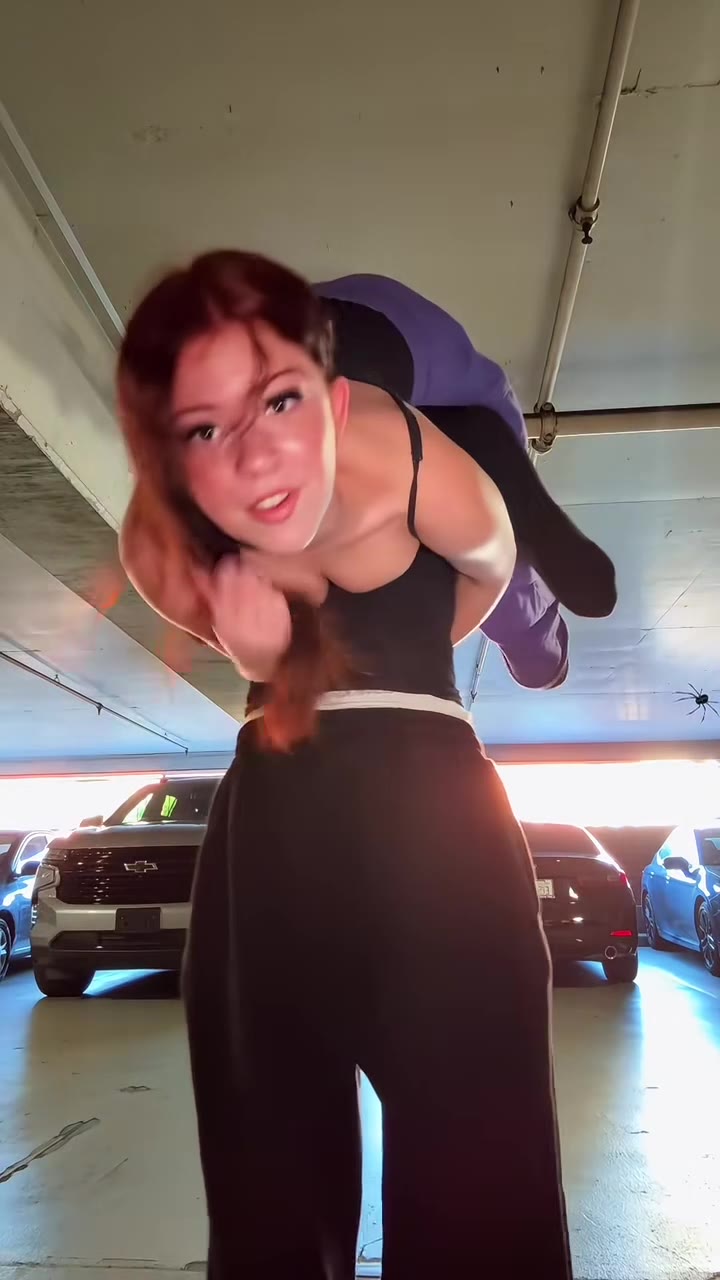
Shoulder Carry AI examples
How to make your Shoulder Carry AI video
Upload Carried & Carrier Photos
Upload Photo 1 for the person who gets swung down into the close-up, and Photo 2 for the person doing the carrying.
Lock Dual-Role Swing Trajectory
Our duo motion-sync pipeline maps Photo 2 to the opening carry and Photo 1 to the 4–9s foreground camera lean.
Generate 9s Video with Synced Sound
Click Generate to export a watermark-free 9-second MP4 with the swing-down reveal and synced audio ready for TikTok and Reels.
What Is the Shoulder Carry AI ('I'm the One') Video Trend?
Remake the Shoulder Carry AI trend on HotDance AI (hotdanceai.com): upload 2 photos, check your instant AI character frame preview with no sign-up, and render a 9s watermark-free HD video with synced audio from 17 credits — no prompt writing or reference video needed.
The Shoulder Carry AI trend—widely tagged on TikTok as the "I’m the One" couple trend—is a fast-paced 9-second two-person video format. It opens with one person standing in a bright room carrying their partner or best friend across their shoulders. At second 2.5, the carrier leans forward and swings the top person smoothly down onto their feet directly in front of the lens. From second 4 to 9, the swung-down person leans right into the camera lip-syncing to "he don’t wanna fw cause I’m the one" while the carrier pops a thumbs-up from behind.
What makes the format blow up across couple and best-friend accounts is the unexpected role-reversal comedy: creators use two photos to make a petite partner effortlessly carry a taller friend, or put two friends into the acrobatic swing-down without risking a real-life living-room fall. Because the carried person’s face stays hidden during the opening 3 seconds and then fills the foreground at second 4, the swing-down acts as a built-in reveal hook.
Animating an over-the-shoulder dismount from two still photos is one of the hardest multi-person transitions in AI video because the two bodies overlap between seconds 2.5 and 4. Standard text prompts merge the two people or keep the original reference faces. HotDance AI drives the routine from a clean 3D cartoon reference clip so Photo 2 stays locked during the opening carry and Photo 1 emerges in crisp focus for the 5-second close-up.
Updated November 10, 2026 · Independent 2-person couple & friend template on HotDance AI.
Trend Origin & Viral Timeline
- November 10, 2026: Published 9-second 2-person couple template with verified 3D cartoon reference video and synced audio.
Shoulder Carry AI timeline breakdown
Opening Over-the-Shoulder Carry
The carrier (Photo 2) stands facing the camera in a bright room holding the carried partner (Photo 1) draped across their shoulders.
Forward Pivot & Swing-Down Dismount
The carrier leans forward and swings the top person smoothly over their shoulder onto the floor in front of them.
Foreground Camera Lean & Lip-Sync
The carried person (Photo 1) lands in front and leans face-first into the camera lens, smiling and mouthing the hook.
Carrier Thumbs-Up & Fist-Pump Finale
While Photo 1 holds the foreground close-up, the carrier (Photo 2) reaches an arm out from behind with a thumbs-up and celebratory pump.
Pro tips for the sharpest Shoulder Carry AI render
Prioritize a Clear Front Face for Photo 1
Because Photo 1 fills the close-up from second 4 to 9, use a well-lit, front-facing portrait with hair and shoulders visible.
Use Upper-Body or Full-Body Shots for Photo 2
A clear chest-up or full-body photo for the carrier helps the model keep their torso and arm proportions natural during the lift.
One Person Per Uploaded Photo
Upload separate single-person photos in Slot 1 and Slot 2 so the two-character pipeline never mixes up the roles.
Viral Shoulder Carry AI ideas and creative twists to try
Role-Swap Couple Surprise
"Taller partner in Slot 1 (Carried) + Smaller partner in Slot 2 (Carrier)"
Flip expectations by putting the taller partner on top for the swing-down reveal and foreground close-up.
Best-Friend 'I'm the One' Duet
"Best friend portrait (Slot 1) + Your portrait (Slot 2) + Crisp Close-Up 1080p"
Create a 9-second Shoulder Carry AI clip for your group chat or TikTok feed without attempting a real living-room flip.
Good to know before you start your video render
- Photo 1 is the person who gets carried and lands in the foreground close-up (4–9s); Photo 2 is the carrier (0–2.5s + thumbs-up behind).
- Swap the two upload slots anytime if you want to reverse who carries whom.
- Every 9-second export comes pre-muxed with the synced audio track and has zero watermarks.
Frequently asked questions about Shoulder Carry AI
What is the Shoulder Carry AI ('I'm the One') trend?
It is a viral 9-second TikTok couple and friend video where one person carries the other on their shoulders, swings them down in front of the lens, and gives a thumbs-up from behind while the front person lip-syncs into the camera.
How do I make a Shoulder Carry AI video from two photos?
Upload Photo 1 for the person being carried and Photo 2 for the carrier, pick your resolution preset, and press Generate. The 9-second HD MP4 renders in about two minutes with the trend audio included.
Which photo ends up leaning into the camera at the end?
Photo 1 (Carried Person) is swung down at second 2.5 and leans directly into the camera from second 4 to 9. Photo 2 (Carrier) is clearly visible at the start and gives the thumbs-up from behind at the end.
Can I swap who carries whom?
Yes. Simply switch the photos between Slot 1 and Slot 2 before clicking Generate to reverse the carrier and carried roles.
Why is the carried person’s face only visible after second 4?
In the original choreography, the person on top is draped across the carrier’s shoulders during the first 3 seconds and reveals their face once they swing down into the foreground close-up.
Does the downloaded video include the sound without a watermark?
Yes. Every 9-second export includes the synced audio track and is completely watermark-free for TikTok, Instagram Reels, and YouTube Shorts.






Render your viral dance clip in seconds
Upload your photos and hit Generate. 100% watermark-free HD export (up to Full HD 1080p).
How much does an AI dance video cost?
Basic
100 credits / month · ≈ 10 videos
$29.90/mo
≈ $2.99 / video
- Watermark-free HD export
- 100 fresh credits monthly
- Unused balance rolls over
- Cancel subscription anytime
ProSave 17%
200 credits / month · ≈ 20 videos
$49.90/mo
≈ $2.50 / video
- Clean 1080p MP4 downloads
- 200 monthly generation credits
- Automatic credit rollover
- Flexible monthly billing
StudioSave 26%
450 credits / month · ≈ 45 videos
$99.90/mo
≈ $2.22 / video
- Priority queue & 1080p output
- 450 credits refreshed monthly
- Keep unused monthly credits
- One-click account management
Or buy credits once
Basic: 10 videos a month for $29.90. The Crew Pack is 25 videos for $99, once.
Single
10 credits · ≈ 1 video
$9.90
≈ $9.90 / video
- Zero watermark on output
- Ready for TikTok & Reels
- Balance stays valid forever
- Auto-refund on failed tasks
Trio PackSave 39%
30 credits · ≈ 3 videos
$17.99
≈ $6 / video
- Unbranded HD video files
- Share across social feeds
- No expiration date on pack
- Instant credit return if blocked
Squad PackSave 41%
50 credits · ≈ 5 videos
$29
≈ $5.80 / video
- Full commercial social rights
- Export vertical 9:16 or 16:9
- Lifetime credit validity
- Protected against render errors
Crew PackSave 60%
250 credits · ≈ 25 videos
$99
≈ $3.96 / video
- Studio-grade watermark-free MP4
- Post to Shorts, Reels & TikTok
- Credits never expire
- Failed renders are refunded
Studio PackSave 66%
600 credits · ≈ 60 videos
$199
≈ $3.32 / video
- High-volume creator bundle
- Supports Ultra & Seedance 2.0
- Use at your own schedule
- 100% credit guarantee on failures
Label PackSave 72%
1800 credits · ≈ 180 videos
$499
≈ $2.77 / video
- Agency & multi-channel scale
- Lowest cost per rendered clip
- Permanent credit balance
- Zero risk on interrupted jobs
Get the next viral trend first
One email whenever a new TikTok or Reels AI trend explodes on HotDance AI. Unsubscribe at any time.
Search HotDance AI on Google
Add HotDance AI to your bookmarks or preferred sources on Google to get instant access to new trending AI video templates before they peak.