Kung Fu Cat AI: The Kung Fu Cat Video, Starring Your Cat
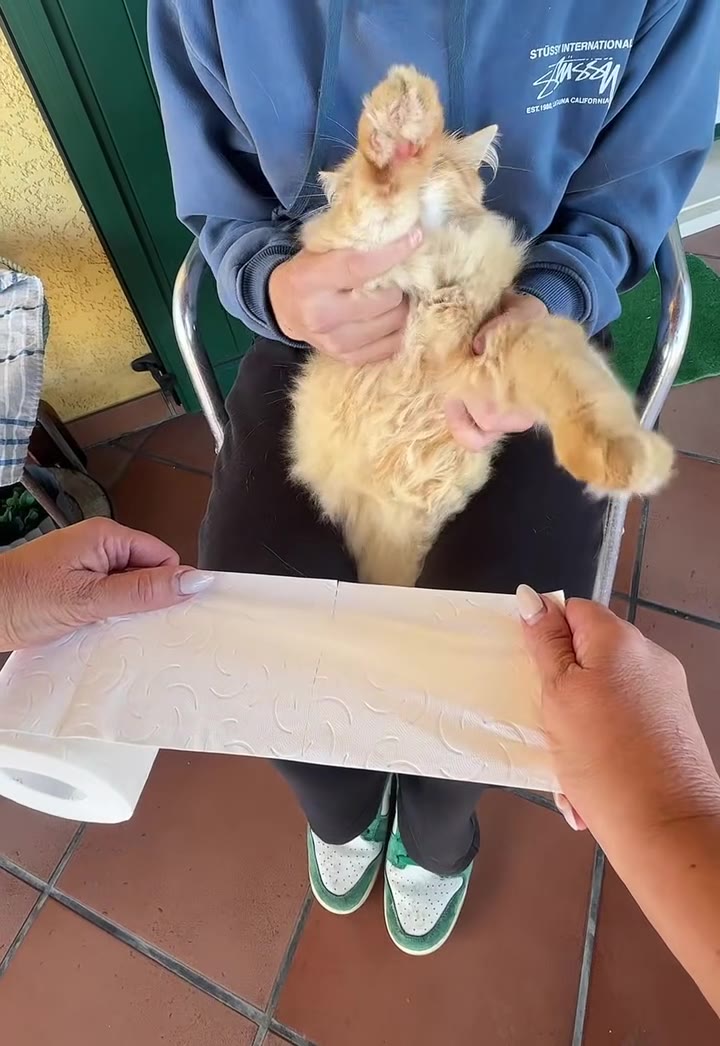
Your cat sits upright on a lap and chops flying paper towel to Kung Fu Fighting without changing its expression. One photo of your cat is all it takes.
- 9s
- 1 person
- 9:16 vertical
- ≈3.4M views
Make the kung fu cat AI video from one photo of your cat: deadpan paws chop paper or a banana to Kung Fu Fighting. 9 seconds, with sound, no prompt.
- 1 Your photo
- 2 Free preview
- 3 Your video
Star in Kung Fu Cat AI
Add a photo and see yourself in the scene first, free.
Free preview first · Automatic refund if it fails
By making it, you confirm you have permission to use the uploaded photos.
The Kung Fu Cat AI prompt and model
- Quality Options
- HD (720p) · Full HD (1080p)
- Credit Price
- From 10 credits (HD · 720p)
- Length & Format
- 9s · 9:16 HD
- Input
- 1 Photo(s)
- Swap The ginger cat in the reference clip is replaced by the animal in your photo; the lap, sofa, shot and timing stay.
- Identity Face, ears, eyes, fur, markings and all four paws come from your photo in every frame, with no orange fur left.
- Prop The paper towel stays or becomes a banana, in the same place and on the same beats.
- Timing Chops, low kicks, the frozen stare and the raised back paw follow the original clip second by second.
- Rules One animal, the holder's face out of frame, five-fingered hands, no extra opening shot, no text or logos, silent render.
Replace the ginger tabby cat in Video 1 with the cat from Image 1. Keep its fur and markings from the image while preserving exact facial identity, proportions, and lighting consistency for the Kung Fu Cat AI sequence.
Why Manual Editing Falls Short
- Without a reference clip, models tend to give you a cat in a martial arts pose rather than this lap routine, and the chops lose the beat.
- If the prompt treats the clip as motion only, the original ginger cat can stay in the frame with only small details borrowed from your photo.
- Fast paws are where AI fails first: extra toes, merged paws and smeared fur show up during the quickest chops.
- Most generators return silent video, and a clip with no song loses the timing that makes the joke work.
✓How HotDance AI Solves It
HotDance locks your facial identity and applies precise stylized landmarks automatically.
Kung Fu Cat AI examples
How to make your Kung Fu Cat AI video
Upload one photo of your cat
A sharp, well-lit photo with the face, both ears and ideally the front paws in view. A cat sitting up works best.
Choose what gets chopped
Paper towel is the classic version. The banana is the fruit version of the trend.
Generate and download
Pick 9:16, 1:1 or 16:9 and press Generate. You get a 9-second MP4 with the trend's original sound and no watermark.
Post it
Post it with the AI-generated label on. The song is already in the file, so no editing is needed.
What is the Kung Fu Cat AI Video Trend?
Remake the Kung Fu Cat AI trend on HotDance AI (hotdanceai.com): upload 1 photo, check your instant AI character frame preview with no sign-up, and render a 9s watermark-free HD video with synced audio from 10 credits — no prompt writing or reference video needed.
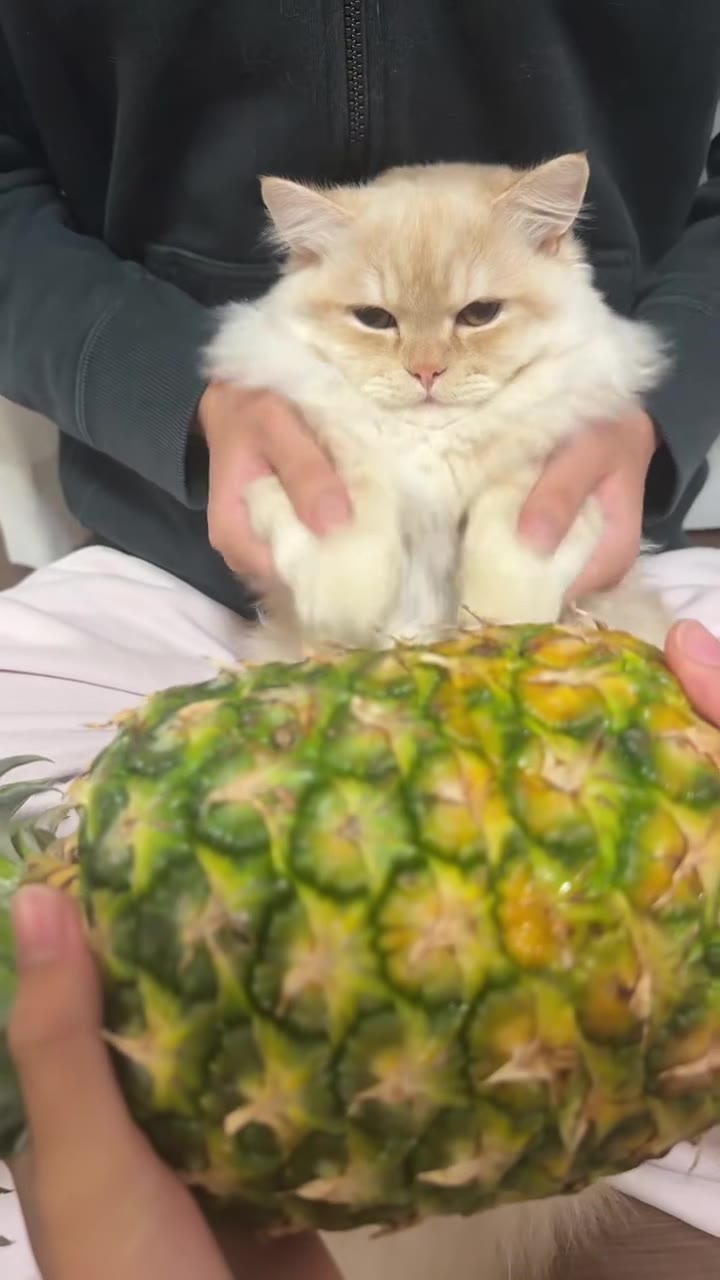
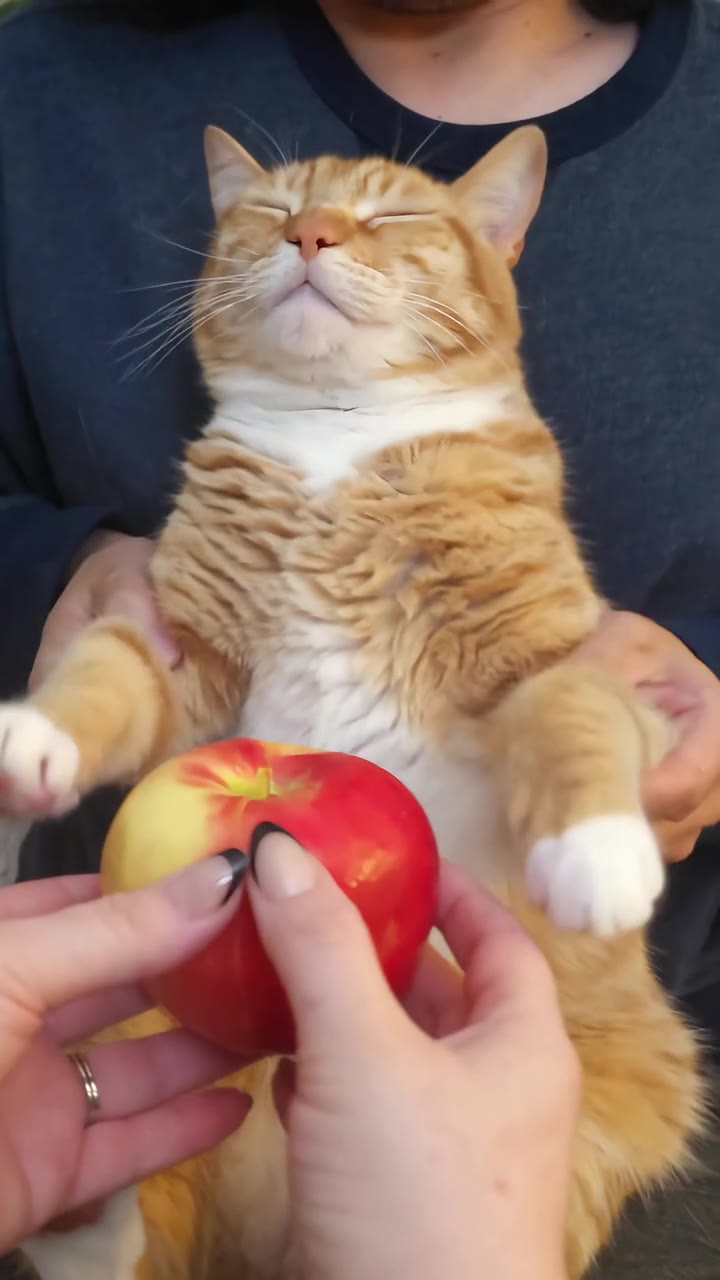
The kung fu cat trend is a short TikTok format with a simple setup. Someone sits with a cat upright on their lap, usually with their head out of frame, and a second person holds a sheet of paper towel in front of it. As the paper swings, the cat's paws fly out in fast chops and kicks while its face stays completely blank. Some versions swap the paper for a pineapple, banana, kiwi, apple or cucumber.
The most-watched post we found went up on 19 October 2026 and had 13.3 million views when we checked on 2 November 2026. Copies with other cats followed within days, and the name kung fu cat comes from the captions. It has only just started spreading, so there is no reliable figure for the trend as a whole. The original clips look filmed with real cats, with a person's hands guiding the paws. A separate, older wave of AI kung fu cats, seen from March 2026, shows cinematic fights and is a different format.
The sound is the opening vocal lines of Kung Fu Fighting by Carl Douglas, from 1974. The cut of each chop to the beat is most of the joke.
The AI version on HotDance AI keeps the 9-second lap routine and swaps in your cat from one photo, so your cat does not have to be held or filmed. You choose paper towel or a banana as the thing being chopped, and the video arrives with the song on it.
Creators searching for how to make kung fu cat ai clips use our kung fu cat ai generator from photo on HotDance AI to animate a still portrait into a watermark-free export without manual keyframing.
Updated November 2, 2026 · HotDance AI is an independent tool. It is not affiliated with TikTok, Instagram, YouTube, or with the owners of any trend, song, game or brand named on its pages.
Trend Origin & Viral Timeline
- November 2, 2026: Page published.
Kung Fu Cat AI timeline breakdown
Guard up
The cat sits upright on a lap, one paw raised, staring at the camera, as a hand holds out paper towel. A paw shoots high.
First strike
The paws chop, a back leg kicks out and the paper is knocked down.
Reset
The paper is gone for a moment and the front paws fold back to a guard.
Second round
The paper comes back and the paws fly overhead and sideways, one after the other.
Low kicks
The paper drops away and the back legs kick while the face does not change.
The stare
The paper rises close to the lens and the cat freezes, wide-eyed, looking straight at the camera.
Final pose
One back paw lifts toward the lens, pads showing, and holds to the end.
Pro tips for the sharpest Kung Fu Cat AI render
Show the face and paws
The clip is a stare and four busy paws. A photo showing your cat's face and front legs gives the model real detail to keep.
One cat per photo
If two pets share the picture, the model may merge them. Crop to the cat you want on the lap.
Sharp fur, soft light
Window light works best. Stripes, a white chest, socks or odd-coloured eyes are what make the cat recognisably yours.
Skip costumes
Hats and clothes can confuse the swap. A plain photo of your cat as it normally looks gives the cleanest result.
Viral Kung Fu Cat AI ideas and creative twists to try
Viral Kung Fu Cat AI TikTok & Reels Post
"Front-facing portrait + Kung Fu Cat AI Original preset + trending audio"
Turn your everyday selfie into a scroll-stopping kung fu cat ai clip ready for TikTok, Instagram Reels, and YouTube Shorts.
Best Friend or Group Chat Surprise
"Casual candid photo + Kung Fu Cat AI HD preset"
Run a friend's portrait through the Kung Fu Cat AI generator for an instant high-reaction reveal in your group chat.
Before-and-After Carousel Reveal
"Original still photo slide 1 -> Kung Fu Cat AI HD export slide 2"
Post your original still photo next to the animated export to maximize watch time and comments.
Good to know before you start your video render
- Your photo supplies the cat only. The person holding it, the second pair of hands and the sofa come from the reference clip, not from your home.
- Likeness is not guaranteed: long-haired cats and busy coats drift the most, and paws can smear during the fastest chops.
- The banana option is a swap of the paper in the reference, so it may look less natural than the paper towel. Neither option has been test-rendered for this page.
- The video comes with the trend's original sound already on it. A failed, timed-out or blocked render returns its credits automatically.
Frequently asked questions about Kung Fu Cat AI
What is the kung fu cat trend?
The kung fu cat trend is a roughly 9-second clip, which HotDance AI rebuilds from one cat photo, in which someone holds a cat upright on their lap while a second person swings paper towel at it and the cat's paws chop back in time to Kung Fu Fighting. The most-watched post we found went up on 19 October 2026.
How do I make a kung fu cat video from one photo?
On HotDance AI you make the kung fu cat video from 1 photo of your cat: upload it, choose paper towel or fruit as the thing being chopped, pick a format and generate. You get a 9-second MP4 with the song already on it. You do not need to film or hold your cat, and you do not write a prompt.
Is there a kung fu cat AI generator or website?
Yes, HotDance AI has a kung fu cat AI generator on this page that works in a browser, on a phone or a computer, with no app to install. It takes 1 photo and returns a 9-second video. It is built on the lap-and-paper-towel version of the trend, not on cinematic sword fights between cartoon-style cats.
Is there a TikTok filter or CapCut template for the kung fu cat?
We have not confirmed a single official TikTok filter for the kung fu cat as of November 2026. Original posts are filmed with real cats, and AI templates in other apps use a different look. On HotDance AI the 9-second lap version comes from 1 photo, so no filter or template is needed.
What AI model and prompt make the kung fu cat video?
HotDance AI makes the kung fu cat video with Seedance by ByteDance: Seedance 2.0 Mini by default, with higher tiers you can choose. The model edits a 9-second reference clip, swapping the cat for the one in your photo. We publish the structure of the prompt on this page, but not the full wording.
How much does the kung fu cat AI video cost?
The kung fu cat AI video on HotDance AI is not free: there is no free generation and no free trial. A standard 9-second video (Standard model, 720p) is 10 credits; better models and higher resolutions cost more. Credit packs start at $9.90 for 10 credits and never expire, plans start at $29.90 a month, and a failed render returns its credits.
Why doesn't the kung fu cat in my video look like my cat?
A kung fu cat video on HotDance AI can drift from your cat when the 1 photo is blurry, dark or hides the face and paws, because the model then falls back on the ginger cat in its reference. Use a sharp photo of one cat with its markings in view. Long-haired cats and busy coats drift the most.
Can I use my dog or another pet for the kung fu cat video?
Yes, HotDance AI accepts 1 photo of a dog or another small pet for the kung fu cat video, and that animal takes the cat's place on the lap for the 9 seconds. Cats match best, because the reference is a cat. Very large dogs may be shrunk to fit the pose. This page is made for pets, not for people.






Render your viral dance clip in seconds
Upload your photo and hit Generate. 100% watermark-free HD export (up to Full HD 1080p).
How much does an AI dance video cost?
Basic
100 credits / month · ≈ 10 videos
$29.90/mo
≈ $2.99 / video
- Watermark-free HD export
- 100 fresh credits monthly
- Unused balance rolls over
- Cancel subscription anytime
ProSave 17%
200 credits / month · ≈ 20 videos
$49.90/mo
≈ $2.50 / video
- Clean 1080p MP4 downloads
- 200 monthly generation credits
- Automatic credit rollover
- Flexible monthly billing
StudioSave 26%
450 credits / month · ≈ 45 videos
$99.90/mo
≈ $2.22 / video
- Priority queue & 1080p output
- 450 credits refreshed monthly
- Keep unused monthly credits
- One-click account management
Or buy credits once
Basic: 10 videos a month for $29.90. The Crew Pack is 25 videos for $99, once.
Single
10 credits · ≈ 1 video
$9.90
≈ $9.90 / video
- Zero watermark on output
- Ready for TikTok & Reels
- Balance stays valid forever
- Auto-refund on failed tasks
Trio PackSave 39%
30 credits · ≈ 3 videos
$17.99
≈ $6 / video
- Unbranded HD video files
- Share across social feeds
- No expiration date on pack
- Instant credit return if blocked
Squad PackSave 41%
50 credits · ≈ 5 videos
$29
≈ $5.80 / video
- Full commercial social rights
- Export vertical 9:16 or 16:9
- Lifetime credit validity
- Protected against render errors
Crew PackSave 60%
250 credits · ≈ 25 videos
$99
≈ $3.96 / video
- Studio-grade watermark-free MP4
- Post to Shorts, Reels & TikTok
- Credits never expire
- Failed renders are refunded
Studio PackSave 66%
600 credits · ≈ 60 videos
$199
≈ $3.32 / video
- High-volume creator bundle
- Supports Ultra & Seedance 2.0
- Use at your own schedule
- 100% credit guarantee on failures
Label PackSave 72%
1800 credits · ≈ 180 videos
$499
≈ $2.77 / video
- Agency & multi-channel scale
- Lowest cost per rendered clip
- Permanent credit balance
- Zero risk on interrupted jobs
Get the next viral trend first
One email whenever a new TikTok or Reels AI trend explodes on HotDance AI. Unsubscribe at any time.
Search HotDance AI on Google
Add HotDance AI to your bookmarks or preferred sources on Google to get instant access to new trending AI video templates before they peak.