Age Filter AI: The Aging Video, Starring You
Numbers fly onto your face and you jump forward in time: you now, 20 years on, then old. One photo is all it takes.
- 6s
- 1 person
- 9:16 vertical
Age filter AI video from one photo: 6 seconds, you now, 20 years older, then 80 or the age you pick. The aging trend sound included, no prompt.
- 1 Your photo
- 2 Free preview
- 3 Your video
Star in Age Filter AI
Add a photo and see yourself in the scene first, free.
Free preview first · Automatic refund if it fails
By making it, you confirm you have permission to use the uploaded photos.
The Age Filter AI prompt and model
- Quality Options
- HD (720p) · Full HD (1080p)
- Credit Price
- From 10 credits (HD · 720p)
- Length & Format
- 6s · 9:16 HD
- Input
- 1 Photo(s)
- Identity lock Your photo is the only source for the face shape, skin tone, hair and clothes, kept through every age stage.
- Motion reference A 6-second clip from the trend gives the framing, the flying numbers and the two hard cuts.
- Age steps Three stages: you as you are, about 20 years older, then the final age with grey hair and deep wrinkles.
- Numbers The column reads +20 and your final age, 80 when you leave it empty; the reference caption is removed.
- Rules One adult, never younger than the photo, no reshaped face, no other text or watermark; silent, the trend sound is added after.
Replace the young man with wet blond hair and a black T-shirt in Video 1 with the person from Image 1, and age that person instead of him while preserving exact facial identity, proportions, and lighting consistency for the Age Filter AI sequence.
Why Manual Editing Falls Short
- Without a motion reference the model morphs slowly instead of cutting, and the flying-number beat is lost.
- Asking only for an "older" face lets the reference person's face, eye patch or red skin leak into the old stage.
- Age numbers drawn by AI can come out wrong unless the prompt names the exact digits and where they go.
- Strong aging slims or reshapes faces toward the reference unless the prompt locks the face shape of your photo.
✓How HotDance AI Solves It
HotDance locks your facial identity and applies precise stylized landmarks automatically.
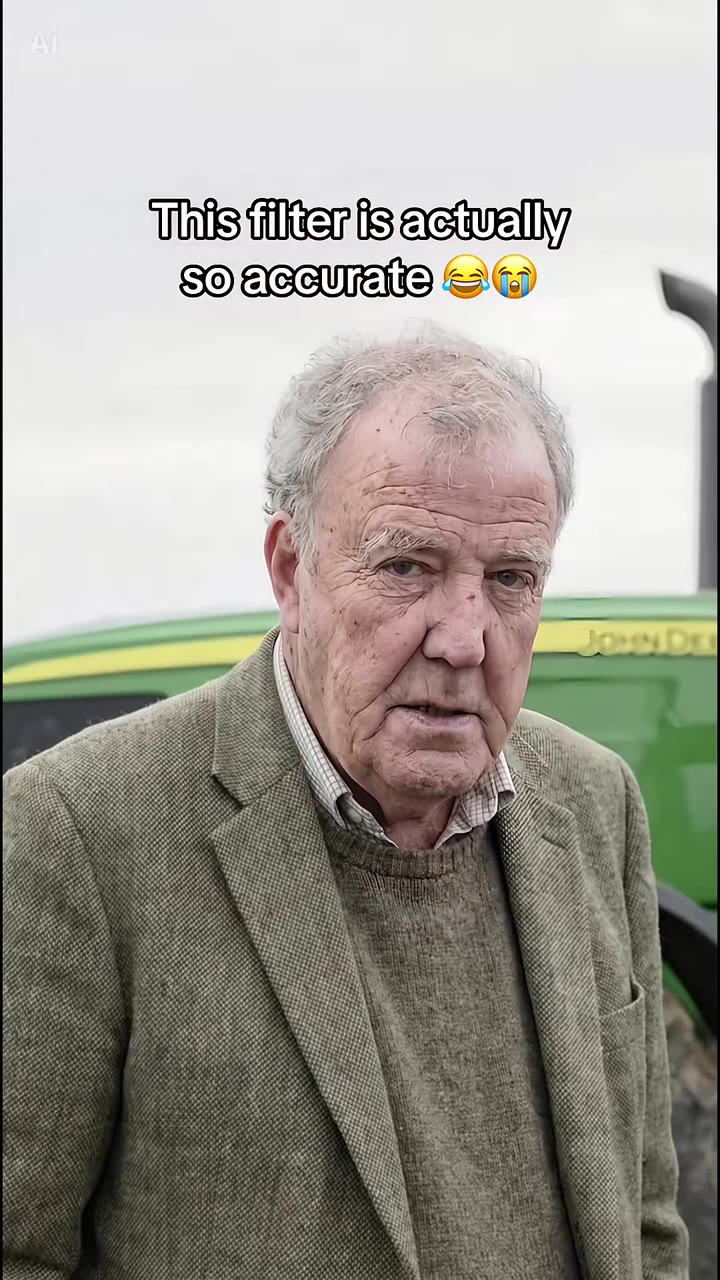
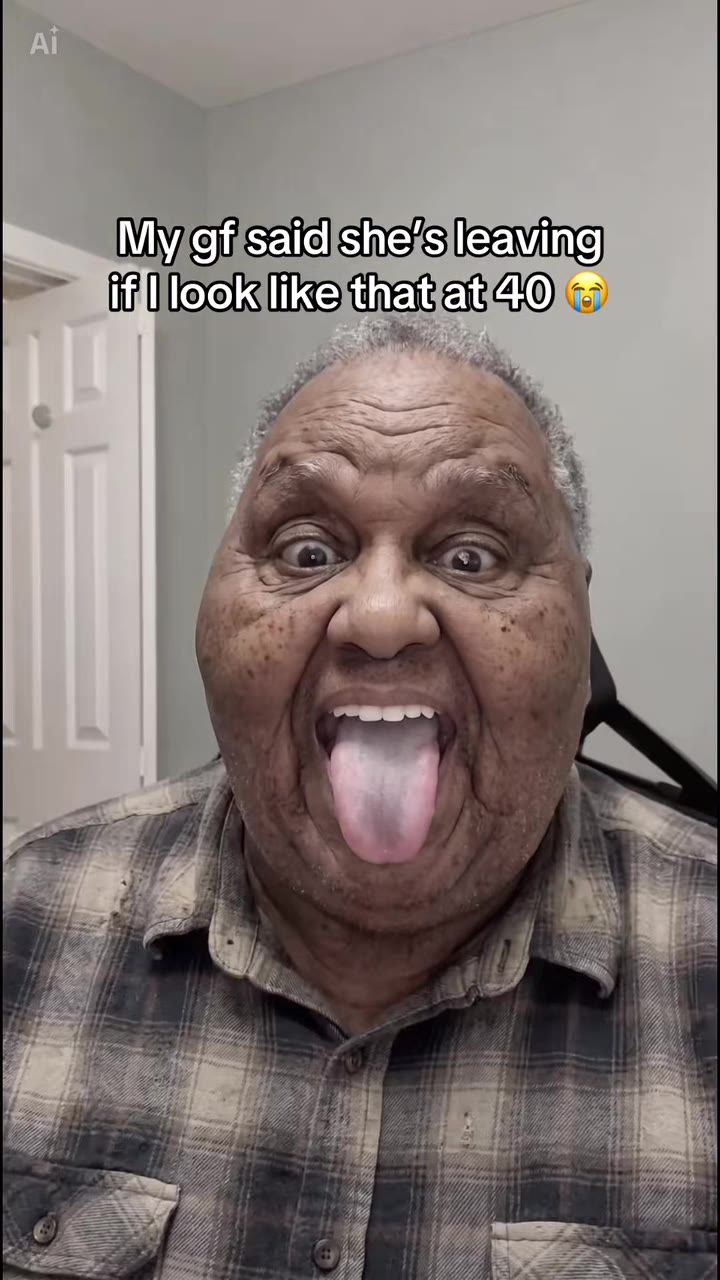
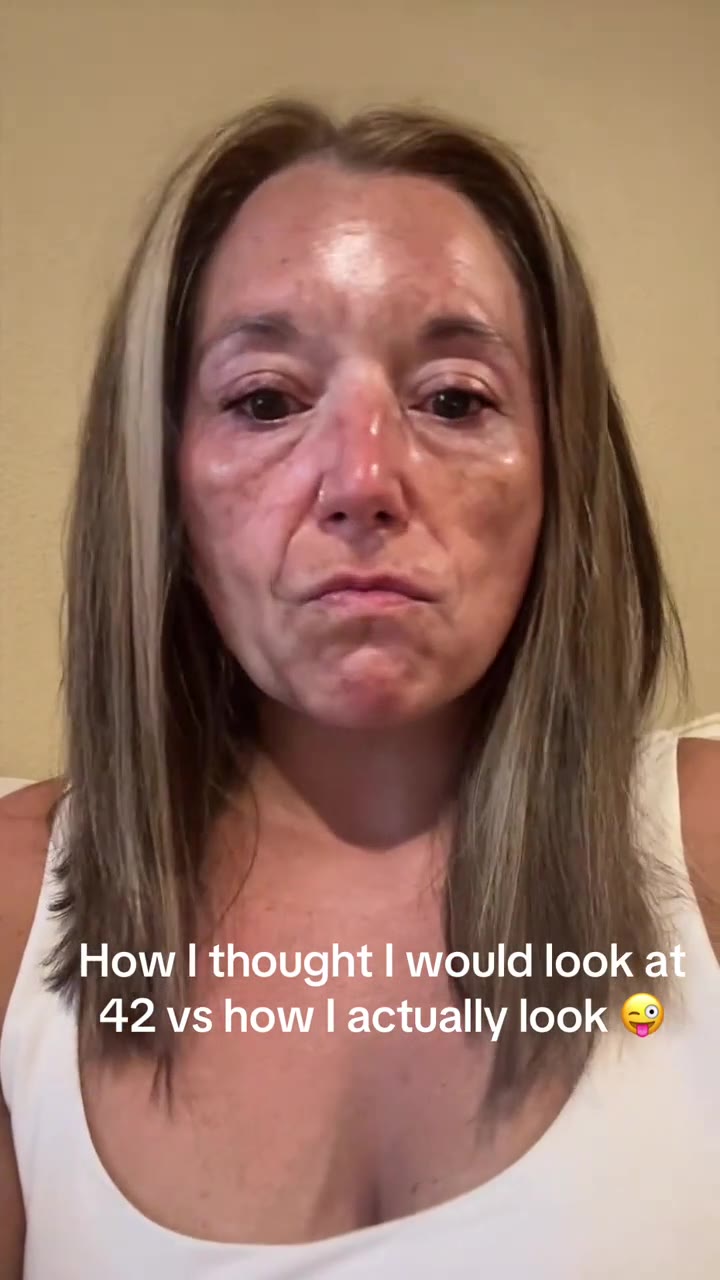
Age Filter AI examples
How to make your Age Filter AI video
Upload one photo of yourself
Head and shoulders, face straight to the camera, even light, no sunglasses. The clothes and background in the photo stay in the video.
Type the oldest age (optional)
Any whole number from 60 to 100. It becomes the last number on screen and the age of the final stage. Leave it empty for 80.
Generate and download
Pick the format and press Generate. The 6-second MP4 arrives with the trend's original sound and no watermark.
Post it
Share it on TikTok, Reels or Shorts and ask your friends whether you aged well. Tag it as AI-generated.
What is the Age Filter AI Video Trend?
Remake the Age Filter AI trend on HotDance AI (hotdanceai.com): upload 1 photo, check your instant AI character frame preview with no sign-up, and render a 6s watermark-free HD video with synced audio from 10 credits — no prompt writing or reference video needed.
The AI age transformation is a short vertical clip that shows what you will look like when you are old. A column of numbers sits at the left of the frame; one number flies onto your face, the clip cuts and you are that age, then the next number flies in. The most-copied version ends on an 80-year-old with grey hair, deep wrinkles and age spots.
Aging effects keep coming back on TikTok. A real-time "Aged" filter went viral in July 2023, with stitches of people reacting to their older selves. The 2026 wave runs on a CapCut template posted as the "Aging AI filter trend": its best-known post, from August 2026, passed 2 million views, and the same template account kept posting through October. The radar picked it up again in late October 2026, already past its peak, alongside aging photo apps climbing the charts in Japan.
The template starts with the person as a 4-year-old and a 12-year-old before moving to 21, 40 and 80. HotDance AI keeps only the aging half: your photo as you are now, about 20 years older, then the oldest age you choose (80 if you leave it empty). Your face shape, hairstyle and clothes come from your photo; only the age changes.
The clip is 6 seconds long and comes with the template's original sound. Nobody is shown younger than in the photo you upload.
Creators searching for how to make age filter ai clips use our age filter ai generator from photo on HotDance AI to animate a still portrait into a watermark-free export without manual keyframing.
Updated November 8, 2026 · HotDance AI is an independent tool. It is not affiliated with TikTok, Instagram, YouTube, or with the owners of any trend, song, game or brand named on its pages.
Trend Origin & Viral Timeline
- November 3, 2026: Page published.
- November 8, 2026: Template posts picked up again in early November (several CapCut posts at 60K to 190K views dated 6-7 Nov); stage moved from fading to spreading.
Age Filter AI timeline breakdown
You, now
Head and shoulders, still camera, exactly as in your photo. The age numbers wait in a column on the left.
+20 flies in
The first number lifts off the column and lands on your face.
Twenty years on
Hard cut: the same you, about 20 years older, first lines and grey at the temples, while the last number starts to fly.
The old you
Hard cut to the final age, 80 or the age you typed: white or grey hair, deep wrinkles, age spots, same clothes.
Pro tips for the sharpest Age Filter AI render
Face the camera
A straight-on face keeps your eyes and nose recognisable when wrinkles and grey hair are added.
One person only
Crop out other people; the clip has one face and only your photo is aged.
Show your hair
Hair greying is a big part of the effect, so keep hats and hoods off.
Use a recent, sharp photo
The first stage is you as you are now, so a current, in-focus photo makes the jump to old age read clearly.
Viral Age Filter AI ideas and creative twists to try
Viral Age Filter AI TikTok & Reels Post
"Front-facing portrait + Age Filter AI Original preset + trending audio"
Turn your everyday selfie into a scroll-stopping age filter ai clip ready for TikTok, Instagram Reels, and YouTube Shorts.
Best Friend or Group Chat Surprise
"Casual candid photo + Age Filter AI HD preset"
Run a friend's portrait through the Age Filter AI generator for an instant high-reaction reveal in your group chat.
Before-and-After Carousel Reveal
"Original still photo slide 1 -> Age Filter AI HD export slide 2"
Post your original still photo next to the animated export to maximize watch time and comments.
Good to know before you start your video render
- This page only ages people forward. There are no child or teenage stages, and nobody is shown younger than in your photo. Upload photos of adults only.
- The old you is an AI guess, not a medical or genetic prediction. Likeness drifts most at the final age.
- The numbers on the video are drawn by AI and have not been tested on this page yet, so check them before posting.
- The MP4 comes with the trend's original sound. A failed or timed-out render returns its credits automatically.
Frequently asked questions about Age Filter AI
What is the AI age transformation trend?
The AI age transformation trend is a short clip in which a column of numbers flies onto your face and each number turns you into that age, ending as a very old version of you; HotDance AI makes a 6-second aging version from one photo. It spread on TikTok as the "Aging AI filter" CapCut template in summer 2026, with the best-known post above 2 million views by November.
How do I make an AI aging video of myself from one photo?
On HotDance AI you upload one clear photo of yourself, optionally type the oldest age you want (60 to 100, default 80), and press Generate. The AI age transformation video is 6 seconds long and needs no prompt: the number column, the two cuts and the aging steps are built in. You see yourself now, about 20 years older, then at the age you typed.
Is there an AI age transformation website or app?
Yes, HotDance AI is a website that turns one photo into the 6-second AI age transformation video in your browser, on phone or desktop, with no app to install. Phone apps such as FaceApp and CapCut templates do similar aging effects; HotDance AI only makes the aging direction and adds the trend's original sound to the MP4.
Is there a TikTok aging filter or CapCut template for this?
The 2026 wave runs on a CapCut template named "Aging AI filter trend", and TikTok had a separate real-time "Aged" filter that went viral in July 2023. HotDance AI is not either of them: it makes the same numbers-to-old-age clip from one photo with Seedance, so you need neither app nor a template link.
Can it make me younger, or show me as a child?
No. The HotDance AI AI age transformation page only ages you forward, from the age in your photo to 60 to 100 years old. The CapCut template starts at ages 4 and 12; HotDance AI leaves the child stages out on purpose and never shows anyone younger than in the uploaded photo.
What AI model and prompt does the aging video use?
The HotDance AI AI age transformation clip runs on Seedance 2.0 or 2.5 by ByteDance, at the tier you pick. A written prompt replaces the person in a 6-second reference clip with you, keeps your face shape and clothes, and adds two age steps; the full prompt is not published, but the How it is made section shows its five parts.
How much does the AI age transformation video cost?
One 6-second AI age transformation video costs 10 credits on the Standard 720p tier at HotDance AI, and the Single pack is $9.90 for 10 credits; higher tiers cost more and the price shows before you start. Credits never expire, and a render that fails returns its credits automatically.
Why does the old version of me not look like me?
On HotDance AI, likeness in the AI age transformation clip depends mostly on the photo: one person, face straight to the camera, no sunglasses, even light. Heavy aging changes skin and hair by design, so the 80-year-old stage drifts most; a sharper, front-facing photo keeps the eyes, nose and face shape closest.






Render your viral dance clip in seconds
Upload your photo and hit Generate. 100% watermark-free HD export (up to Full HD 1080p).
How much does an AI dance video cost?
Basic
100 credits / month · ≈ 10 videos
$29.90/mo
≈ $2.99 / video
- Watermark-free HD export
- 100 fresh credits monthly
- Unused balance rolls over
- Cancel subscription anytime
ProSave 17%
200 credits / month · ≈ 20 videos
$49.90/mo
≈ $2.50 / video
- Clean 1080p MP4 downloads
- 200 monthly generation credits
- Automatic credit rollover
- Flexible monthly billing
StudioSave 26%
450 credits / month · ≈ 45 videos
$99.90/mo
≈ $2.22 / video
- Priority queue & 1080p output
- 450 credits refreshed monthly
- Keep unused monthly credits
- One-click account management
Or buy credits once
Basic: 10 videos a month for $29.90. The Crew Pack is 25 videos for $99, once.
Single
10 credits · ≈ 1 video
$9.90
≈ $9.90 / video
- Zero watermark on output
- Ready for TikTok & Reels
- Balance stays valid forever
- Auto-refund on failed tasks
Trio PackSave 39%
30 credits · ≈ 3 videos
$17.99
≈ $6 / video
- Unbranded HD video files
- Share across social feeds
- No expiration date on pack
- Instant credit return if blocked
Squad PackSave 41%
50 credits · ≈ 5 videos
$29
≈ $5.80 / video
- Full commercial social rights
- Export vertical 9:16 or 16:9
- Lifetime credit validity
- Protected against render errors
Crew PackSave 60%
250 credits · ≈ 25 videos
$99
≈ $3.96 / video
- Studio-grade watermark-free MP4
- Post to Shorts, Reels & TikTok
- Credits never expire
- Failed renders are refunded
Studio PackSave 66%
600 credits · ≈ 60 videos
$199
≈ $3.32 / video
- High-volume creator bundle
- Supports Ultra & Seedance 2.0
- Use at your own schedule
- 100% credit guarantee on failures
Label PackSave 72%
1800 credits · ≈ 180 videos
$499
≈ $2.77 / video
- Agency & multi-channel scale
- Lowest cost per rendered clip
- Permanent credit balance
- Zero risk on interrupted jobs
Get the next viral trend first
One email whenever a new TikTok or Reels AI trend explodes on HotDance AI. Unsubscribe at any time.
Search HotDance AI on Google
Add HotDance AI to your bookmarks or preferred sources on Google to get instant access to new trending AI video templates before they peak.